Can a Steering Wheel Cover Block Steering Wheel Buttons?
Quick Answer
Yes, a steering wheel cover can partially block or interfere with steering wheel buttons if the cover’s inner lip is too wide, if your buttons sit flush against the inner rim, or if you use a custom lace-up wrap without pulling the spoke flaps taut. While standard slip-on covers only wrap around the outer rim, thick padding can overhang recessed thumb switches, cover rear-mounted audio rockers, or block capacitive touch sensors used by advanced driver-assistance systems.
How Steering Wheel Covers Interact With Wheel Controls
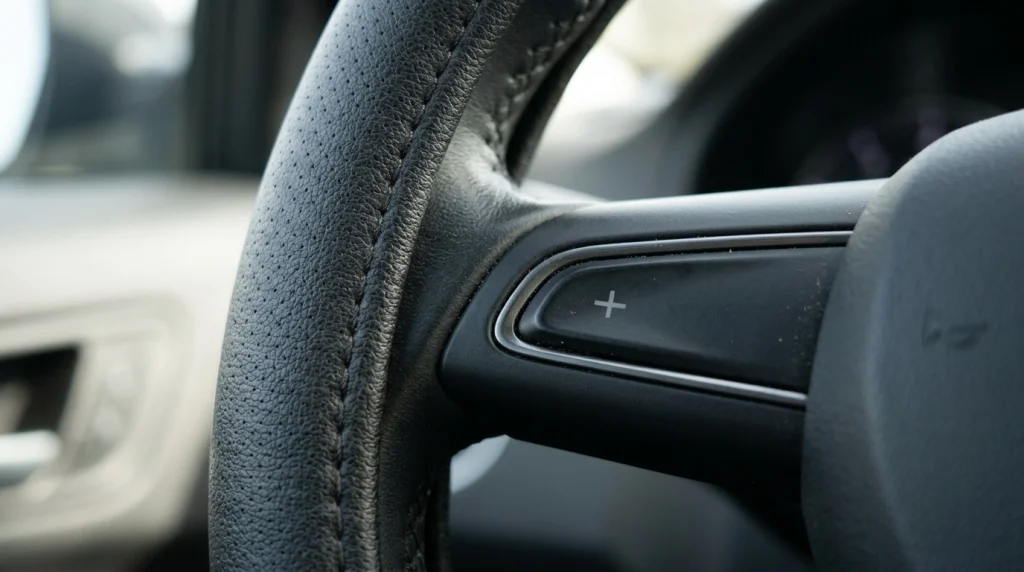
A steering wheel cover blocks or hinders buttons when its material extends past the outer circular rim and encroaches on the horizontal or vertical spokes where control modules are mounted. Whether interference happens depends entirely on the geometry of your steering wheel and the type of cover you install.
Most aftermarket covers fall into two design categories, and each interacts with your controls differently:
- Universal Slip-On Covers: These have a rigid rubber or silicone inner ring that stretches over the outer perimeter of the wheel. Because they have an open center channel, they pass behind the steering spokes rather than wrapping over them. However, a thick outer lip can still crowd buttons placed right at the edge of the spoke.
- Stitch-On (Lace-Up) Wraps: These are thin pieces of leather, microfiber, or suede tailored with extra material flaps that extend onto the spokes. If those spoke flaps are poorly aligned or too long for your specific trim, they will directly cover the edges of your button bezels.
Even a two-millimeter overlap matters. Modern steering wheels pack audio controls, menu toggles, voice command triggers, and adaptive cruise control switches into tight spaces. If a cover’s edge rests against the side of a physical rocker switch, the button can bind down when pressed or fail to click entirely.
4 Situations Where a Cover Will Interfere With Your Buttons
Not every steering wheel is vulnerable to button interference. You are most likely to run into blocked or sticky controls if your vehicle features one of the following four design layouts.
1. Rim-Flush and Contoured Thumb Switches
On many older or base-model vehicles, buttons sit well inside the central spoke area, leaving a half-inch gap between the switch and the wheel rim. On newer vehicles with thick sport grips at the 10-and-2 and 9-and-3 positions, manufacturers extend the control modules outward so your thumbs can reach them without lifting off the wheel.
When a button module meets the inner curve of the rim with zero clearance, adding a bulky plush, sheepskin, or double-padded leather slip-on cover creates a raised wall right next to the outer button. You can still see the switch, but the side of your thumb hits the cover’s seam before it can press the button flat.
2. Rear-Mounted Audio Rockers and Paddle Shifters
Many drivers check the front of their steering wheel for clearance and forget to inspect the back of the spokes. Several automakers—particularly Stellantis brands like Jeep, Dodge, and Ram, as well as select GM and Honda models—place volume and track-skip rocker buttons on the back side of the horizontal spokes where your middle and ring fingers rest.
Similarly, vehicles with automatic transmissions often mount upshift and downshift paddle shifters directly behind the 9-and-3 spokes. When a slip-on cover wraps around the rear of the rim, its inner rubber collar bridges the gap behind the spoke. If the paddle shifter has a short throw or sits close to the rim, the back of the paddle will strike the cover before engaging the switch, or your fingertips will lose the clearance needed to pull the lever.
3. Capacitive Touch Panels and Scroll Wheels
Many modern vehicles have replaced mechanical clicking buttons with flat, gloss-black capacitive touch panels and thumb scroll wheels. Because capacitive panels rely on the electrical conductivity of your skin—and sometimes require a swipe gesture rather than a vertical press—they need full surface access.
If the lip of a steering wheel cover hangs over the outer two millimeters of a capacitive slider (such as a touch volume bar), your thumb cannot complete a full swipe motion. Scroll wheels located near the inner rim are also easily jammed if loose fabric or leather bunching rubs against the knurled roller.
4. Poorly Fitted Universal Stitch-On Wraps
Universal sew-on wraps are sold by outer wheel diameter (typically 14.5 to 15 inches), not by spoke geometry. Because they include pre-cut leather extensions meant to tuck under the plastic trim of the 3, 6, and 9 o’clock spokes, those flaps rarely match every car’s exact spoke width.
If the leather flap isn’t tucked cleanly beneath the plastic bezel using a plastic pry tool—or if the bezel sits tightly glued with no gap—the excess leather bunches up right over the outer buttons.
The table below compares how different steering wheel cover styles affect various control layouts:
| Cover Type | Front Spoke Buttons | Rear Rockers / Paddles | Capacitive Rim Sensors |
|---|---|---|---|
| Thin Microfiber / Leather Slip-On | Low risk; clears most buttons with 3 mm+ gap | Low to moderate risk; check finger gap behind spoke | High risk; thick rubber core blocks touch detection |
| Plush / Sheepskin / Thick Padded | High risk; obscures rim-adjacent switches | High risk; fills finger space behind paddles | Blocks sensors and insulates heated wheels |
| Universal Stitch-On Wrap | Moderate risk; untucked spoke flaps can overlap buttons | Moderate risk; rear seam knots can crowd rockers | Moderate risk; may dampen sensitivity depending on thickness |
| Vehicle-Specific Custom Stitch Wrap | Minimal risk; precision-cut around factory bezels | Minimal risk; contoured for factory paddles | Moderate risk; check OEM sensor rules before installing |
| Segmented Clip-On Grip | Low risk if placed away from 9-and-3 spokes | Low risk; leaves back of spokes uncovered | Blocks sensors only where segments are clipped |
As the comparison shows, thin slip-on covers and vehicle-specific wraps preserve button access best, whereas thick padded covers and universal stitch wraps require careful clearance checks.
Beyond Physical Buttons: Hidden Sensors a Cover Can Block
Even if a steering wheel cover leaves every physical button completely exposed, it can still disable critical electronic features hidden inside the steering wheel rim itself.
Hands-On Detection (HOD) and Driver Assistance Sensors
Older lane-keeping systems detect whether your hands are on the wheel by measuring steering torque—meaning you have to slightly tug the wheel every few seconds. However, many newer vehicles equipped with Level 2 driver assistance (such as adaptive cruise with lane centering) use a capacitive Hands-On Detection (HOD) mat built directly beneath the factory leather rim.
These capacitive mats sense the electrical properties of your hands resting lightly on the rim. When you install an insulated rubber-core slip-on cover, the sensor can no longer detect your skin. As a result, the dashboard will repeatedly flash “Keep Hands on Steering Wheel” warnings and may disengage lane-centering or adaptive cruise control even while you are holding the wheel firmly.
Key Insight
If your car’s lane-keeping system only requires a gentle touch on the rim rather than a physical turning motion to clear “hands-on” alerts, your wheel uses capacitive sensors. Installing a thick rubber-backed steering wheel cover will almost always weaken or block that signal.
Driver Attention Cameras and Infrared Bars
Advanced hands-free highway systems (such as GM Super Cruise, Ford BlueCruise, and similar eye-tracking setups) often place a small infrared camera or LED light bar either on top of the steering column housing or directly embedded into the upper rim of the steering wheel.
If your vehicle mounts its infrared transceiver along the upper steering wheel rim, putting any cover over the top section will completely blind the system, disabling hands-free driving and triggering a system fault message. Even when the camera sits on the steering column behind the wheel, an oversized, fluffy steering wheel cover can block the camera’s line of sight to your eyes depending on your seat height and steering tilt angle.
Heated Steering Wheel Elements
While the heating button itself might remain accessible, wrapping a thick cover over a heated steering wheel creates two problems. First, the rubber inner ring acts as a thermal insulator, drastically slowing down how long it takes for warmth to reach your fingers. Second, trapping concentrated heat beneath a tight synthetic or rubber cover can prematurely degrade the factory leather or vinyl underneath over multiple winters.
Safety Risks of a Poorly Fitted Steering Wheel Cover
Blocked audio buttons are mostly an annoyance, but interfered cruise control switches or slipping covers present genuine road hazards.
- Delayed Cruise Control Disengagement: If the “Cancel” button or adaptive distance toggle is recessed next to a thick cover lip, fumbling to find the button by feel takes your attention off the road.
- Stuck or Ghost Button Presses: If a stitch-on cover’s spoke flap wedges tightly against the edge of a rocker switch, it can hold the button halfway down. On many CAN-bus steering wheel circuits, one permanently depressed switch locks out all other buttons on that same spoke until the pressure is released.
- Cover Slippage on the Rim: The most dangerous failure occurs when a universal cover is slightly too large for the wheel’s outer diameter or grip circumference. During an emergency swerve or tight parking turn, the cover can slip over the factory rim without turning the wheels.
Warning
Never drive with a steering wheel cover that shifts, rotates, or holds a cruise control switch down. Make sure your cover never prevents you from maintaining proper steering grip, posture, and airbag clearance—keep at least 10 inches between your breastbone and the center airbag cover by holding the rim securely at the 9 and 3 o’clock positions.
How to Measure Your Wheel and Check Button Clearance Before Buying
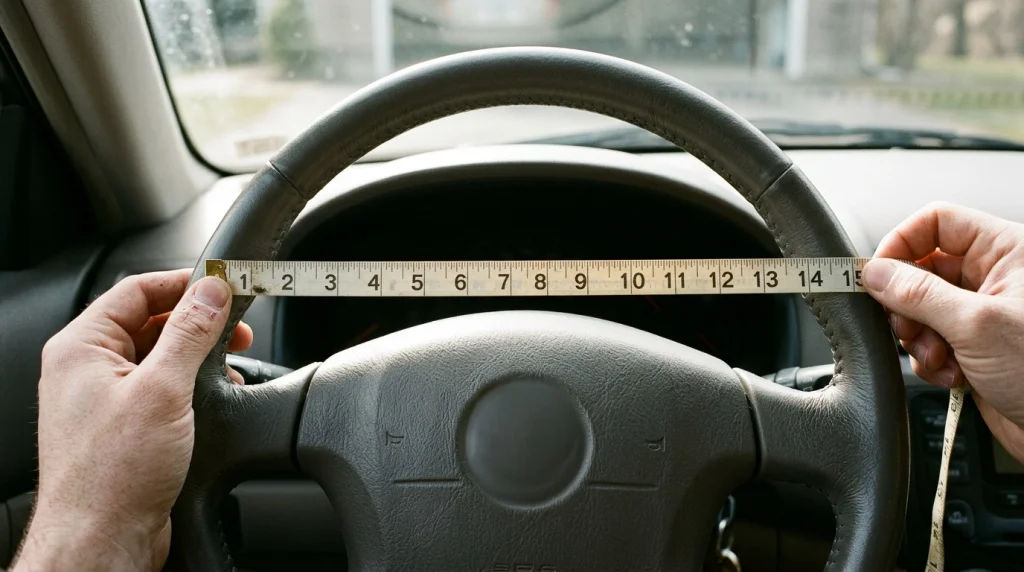
You can avoid button interference entirely by taking three quick measurements on your steering wheel before ordering a cover.
- Measure the Outer Diameter: Hold a tape measure straight across the center of the steering wheel from the outside left edge to the outside right edge. Standard passenger cars usually measure between 14.5 and 15 inches (37 to 38 cm), while trucks and SUVs often measure 15.5 to 16 inches. If your wheel is a flat-bottom (“D-shaped”) design, measure both horizontally and vertically and buy a cover specifically shaped with a flat bottom.
- Measure the Rim Grip Circumference: Wrap a flexible cloth measuring tape around the thickness of the rim itself at a spot away from the spokes. Standard rims are 3.75 to 4.25 inches around. If your grip is thinner than what the cover is built for, the cover’s inner channel won’t stretch tight—leaving loose inner lips that sag over adjacent buttons.
- Check the Spoke-to-Button Gap: Look closely at the 9 o’clock and 3 o’clock spokes where the rim meets the button housing. Measure the gap between the outermost edge of the closest button and the inner curve of the steering wheel rim.
- If you have 5 mm (about 1/4 inch) or more of bare plastic: Almost any standard slip-on cover will fit without touching the buttons.
- If the button sits within 1 to 3 mm of the rim: Avoid thick plush, padded, or bulky silicone covers. Choose a thin, low-profile leather or microfiber slip-on cover, or a vehicle-specific stitch wrap.
- Inspect Behind the Spokes: Place your hands at 9 and 3 o’clock and curl your fingers behind the spokes. Note how much space exists between the back of the rim and any audio rockers or paddle shifters. Ensure a cover adding 3 to 5 mm of thickness to the rim won’t pinch your fingertips against the paddles.
How to Fix a Cover That Is Blocking Your Steering Wheel Buttons
If you already installed a steering wheel cover and noticed that a button feels stiff, unresponsive, or partially covered, follow these steps to diagnose and correct the issue:
- Check for Rotational Misalignment (D-Shaped or Contoured Covers): Many slip-on covers include molded thumb rests or cutouts meant to align with the 9-and-3 spokes. If a raised thumb bolster is rotated even half an inch over the spoke, its extra padding will crowd your thumb switches. Pull the cover off, center the top seam at 12 o’clock, and reinstall it symmetrically.
- Roll the Inner Lip Back Around the Spoke Junction: On slip-on covers, the flexible inner lip sometimes folds inward against the front of the spoke during installation instead of wrapping smoothly behind the rim. Use your fingers to roll the inner edge of the cover toward the rear of the wheel at the 3 and 9 o’clock junctions so it clears the front button bezel.
- Tuck Stitch-On Flaps Under the Bezel: If a sew-on wrap’s leather spoke extension is overlapping a button, do not leave it resting on top of the switch. Use a thin, flat plastic trim tool (usually included in stitch-wrap kits) to gently press the edge of the leather underneath the gap around the plastic steering wheel trim.
- Replace Oversized or Bulky Covers Immediately: Never attempt to cut or notch the inner rubber core of a slip-on cover with scissors or a utility knife to make room for a button. Cutting the inner tension ring destroys the structural grip that holds the cover tightly to the wheel, creating a serious slipping hazard while steering.
Tip
Before taking your car onto public roads after installing or adjusting any cover, sit in the parked vehicle with the ignition on and press every front button, scroll wheel, and rear paddle shifter through its full range of motion. Verify that each switch clicks cleanly and springs back without dragging against the cover.
Related Product
Thin Microfiber Leather Steering Wheel Covers
A low-profile microfiber leather cover protects your steering wheel rim while keeping inner lip bulk minimal around close-mounted spoke buttons and paddle shifters.
As an Amazon Associate, we earn from qualifying purchases.
Frequently Asked Questions
Can a steering wheel cover interfere with the driver’s airbag?
A standard steering wheel cover wraps only around the outer rim and does not cover the central horn pad where the driver’s airbag deploys. However, you should never use full-wheel storage covers while driving or attach decorative emblems or phone mounts to the center hub, as anything placed over the center pad can become a dangerous projectile during airbag deployment.
Will a steering wheel cover stop my paddle shifters from working?
It can if the cover is too thick or if your paddle shifters sit very close to the back of the rim. Bulky covers reduce the finger clearance between the rim and the paddle lever, and in tight setups, the back of the paddle can hit the cover before completing its click. Thin slip-on covers or custom stitch wraps rarely cause this issue.
Can I trim a steering wheel cover if it rubs against a button?
You should never cut or notch a slip-on steering wheel cover. The inner rubber ring relies on continuous tension to grip your wheel safely, and cutting into it can cause the cover to tear or slip while turning. On a custom stitch-on leather wrap, minor trimming of an untucked spoke flap is sometimes possible, provided you do not cut across the stitched seam lines.
Why did my steering wheel buttons stop working right after putting on a cover?
If multiple buttons on one side of the wheel suddenly stop responding after installing a cover, check whether the cover’s edge is pressing one of the switches slightly down. Most modern steering wheels wire a bank of buttons through a shared circuit; if the cover holds one rocker switch partially engaged, the control module ignores inputs from the other buttons until that switch is freed.
Do flat-bottom steering wheels need a special cover to avoid blocking buttons?
Yes, flat-bottom (“D-shaped”) steering wheels often place lower spoke trim and sport-mode buttons closer to the corners of the flat section. Putting a round cover on a D-shaped wheel causes the inner lip to bridge across the flat bottom, creating loose gaps that can sag over lower spoke controls and slip during turns.
Is it safe to put a steering wheel cover over a heated steering wheel?
While it will not block the heated wheel switch itself, most vehicle manufacturers advise against putting thick covers over heated rims. The cover insulates the heat so your hands warm up much slower, and trapping excess heat underneath a tight rubber-backed cover can wear out the factory leather wrap over time.
Conclusion
A steering wheel cover will not block your controls if you match the cover’s profile to your steering wheel’s spoke clearance. Most button interference happens when a thick padded slip-on cover crowds switches that sit flush against the inner rim, restricts finger space behind rear paddle shifters, or when a universal stitch-on wrap’s spoke flaps are left untucked. Additionally, drivers of newer vehicles should check whether their steering wheel rim contains capacitive hands-on detection sensors or infrared eye-tracking bars before installing any cover. Measure your wheel diameter, rim thickness, and button-to-rim gap first, and test every switch while parked before driving.

Daniel Brooks is an automotive writer and product researcher focused on car accessories, car tech, maintenance, and practical driving guides. At Plug-in Car World, he helps drivers make smarter automotive decisions through honest reviews and research-driven content.