Can a Steering Wheel Cover Block or Damage Steering Wheel Buttons?
Quick Answer
Yes, a poorly fitted cover can block steering wheel buttons, and it can also wear them down over time. A good cover leaves every button, paddle, and spoke control fully exposed and easy to press. If you are unsure about airbag or control safety, check NHTSA safety guidance and your owner’s manual before you fit a cover.
The short version
- Block risk: Thick or shifting material can sit over a button edge and stop a clean press.
- Damage risk: Extra pressure and trapped grit can wear symbols, trim, and button feel over time.
- Highest risk: Universal covers that are too large, too thick, or made to cover the spokes.
- Lowest risk: Custom-fit covers with cutouts that match your wheel and button layout.
- Quick test: Press every button before and after fitting, then remove the cover if one feels stuck.
Do this first
- Measure your wheel diameter before you order.
- Match the cover to your exact button layout, not just your car brand.
- Stop and refit if any button feels mushy, stiff, or hard to find by touch.
A cover should protect your wheel, not hide the controls you use every day. This guide explains how blocking happens, when damage is likely, and how to pick a safer fit.
You’ll also learn what to check if a button stops working after you fit a cover.
In This Guide
- Can a Cover Block Your Steering Wheel Buttons?
- How Can a Cover Damage Buttons Over Time?
- Which Cover Types Are Riskiest for Button Controls?
- How Do You Choose a Cover That Keeps Buttons Working?
- What Should You Do If Buttons Stop Working After Fitting a Cover?
- Are Steering Wheel Covers Safe Around Airbags and Controls?
- Frequently Asked Questions
- The Bottom Line
Can a Cover Block Your Steering Wheel Buttons?
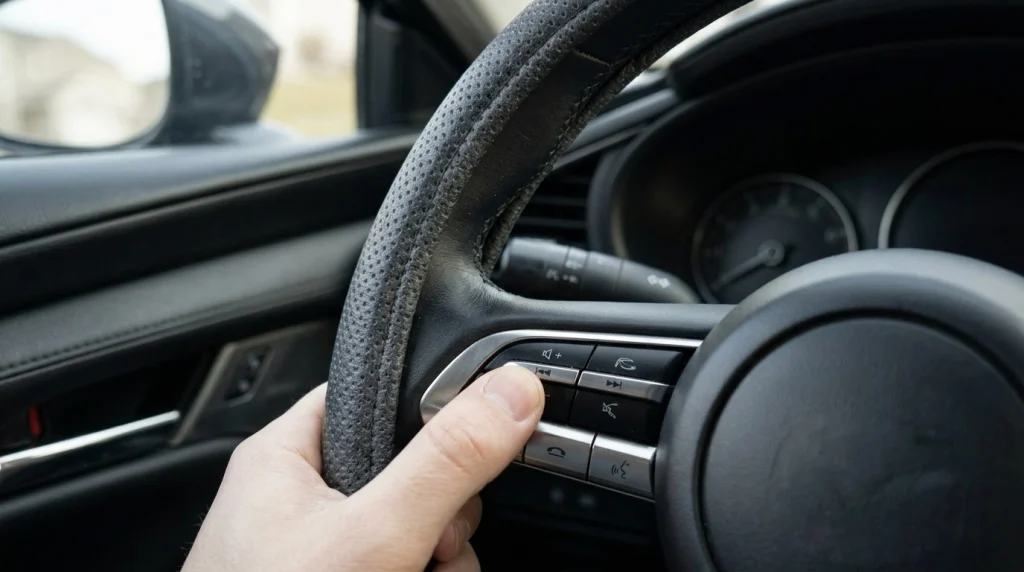
Yes, a cover can block a button when material sits over it or shifts onto it. That risk rises fast when a cover crosses the spokes instead of staying on the rim.
A steering wheel cover is a sleeve that fits over the rim of your wheel to protect it and improve grip. A rim-only cover should not touch the buttons at all.
Blocking can take a few forms:
- Edge overlap: The cover edge creeps over the outer edge of a button.
- Spoke coverage: Material stretches across a spoke and hides one or more controls.
- Thick padding: Extra padding makes a small button hard to feel or press.
- Shift after use: Heat, sweat, and hand pressure move a loose cover out of place.
Buttons need a clear path and a firm press. Thick padding can dull that feel.
Drivers often notice the problem first with volume, phone, or cruise buttons. Those controls sit close to the rim on many wheels.
Section takeaway: A cover blocks buttons when it crosses the spokes, overlaps a button edge, or shifts out of place.
How Can a Cover Damage Buttons Over Time?
A cover rarely breaks a button in one day. Damage usually builds from pressure, friction, heat, and trapped dirt.
Think of it as wear, not a single impact. You press harder, the edge rubs more, and grit stays trapped longer.
Common damage paths include:
- Hard pressing: You push harder through thick material, which strains the button switch.
- Trapped grit: Dust and sand sit under the edge and scratch trim or symbols.
- Heat and moisture: Trapped heat and sweat can dry, crack, or stain soft button surfaces.
- Tight stitching: Laces or seams pull across a spoke and press on a button housing.
- Sticky residue: Adhesive-backed grips can leave residue that attracts dirt around controls.
Touch controls face a higher risk than old-style click buttons. A thick cover can confuse a swipe or a light tap.
Watch for these early warning signs:
- A button needs two presses to work.
- Symbols fade faster near the cover edge.
- A button feels loose, gritty, or uneven.
- Trim around a spoke starts to lift or crack.
None of these signs proves the cover caused the fault on its own. They do mean you should remove the cover and test the button clean.
Section takeaway: Covers damage buttons mainly through added pressure, friction, and trapped dirt, not through one hard press.
Which Cover Types Are Riskiest for Button Controls?
Risk depends less on material alone and more on fit, thickness, and spoke coverage. A thin, well-cut cover beats a thick, loose one in most cases.
| Cover type | Button access | Main risk | Best check |
|---|---|---|---|
| Slip-on universal | Varies by size | Shifts and overlaps buttons | Exact diameter and spoke layout |
| Custom-fit slip-on | Usually clear | Wrong model year or trim | Model, year, and trim match |
| Lace-on or stitch-on | Clear if rim-only | Seams cross a spoke | Seam path before you lace it |
| Silicone or rubber grip | Usually clear | Thick grip dulls touch controls | Press and swipe test after fitting |
| Thick padded or fuzzy | Often reduced | Bulk hides small buttons | Find every button by touch alone |
No cover type is safe if it covers the spokes. Check product photos for button cutouts before you buy.
Illustrative example: a driver who fits a universal cover on a wheel with spoke buttons may find the lower buttons half-covered. That example shows why layout matters more than brand name alone.
Section takeaway: The riskiest covers are loose, thick, or spoke-crossing, while a rim-only custom fit keeps controls clear.
How Do You Choose a Cover That Keeps Buttons Working?
Start with size, then layout, then thickness. A cover that fails any of those three checks will fight your buttons.
Most car wheels measure 14.5 to 15.5 inches across. Larger trucks and SUVs can measure 15 to 17.5 inches.
Measure across the centre of your wheel, rim to rim. Do not guess from your car brand alone.
Follow these fit checks in order:
- Confirm your wheel diameter in inches.
- Count your spoke buttons and note their exact positions.
- Look for cutouts or a rim-only design in the product photos.
- Check thickness at the rim, not just in the centre of the grip.
- Test every button right after fitting, before a long drive.
Slip-on covers usually take 5 to 15 minutes to fit. Lace-on covers often take 30 to 60 minutes, so plan extra time to keep seams off the spokes.
General vehicle guides from Edmunds can help you confirm your model and trim. Your owner’s manual stays the final word on controls.
Price alone tells you little about button safety. Button-friendly covers in general retail ranges often cost about $15 to $50, but fit matters more than price tier.
Section takeaway: Measure first, match the button layout second, and test every control before you trust the fit.
What Should You Do If Buttons Stop Working After Fitting a Cover?
Remove the cover first, then test each button again. That simple check tells you if the cover caused the fault.
Work through these steps in order:
- Remove the cover slowly and do not force a stuck edge.
- Press each button once and note which ones feel odd.
- Look for trapped grit, a lifted edge, or a pressed-down button.
- Follow your owner’s manual for safe control testing.
- Book a mechanic if a button still fails with the cover off.
Do not open the steering wheel hub or poke around the airbag area. That work needs proper training and tools.
RepairPal offers general repair-cost ranges, so you can compare local quotes before you book a visit. Get a local quote for your exact fault, since costs vary by model and shop.
Section takeaway: Remove the cover, retest clean, and get help if the fault stays after removal.
Are Steering Wheel Covers Safe Around Airbags and Controls?
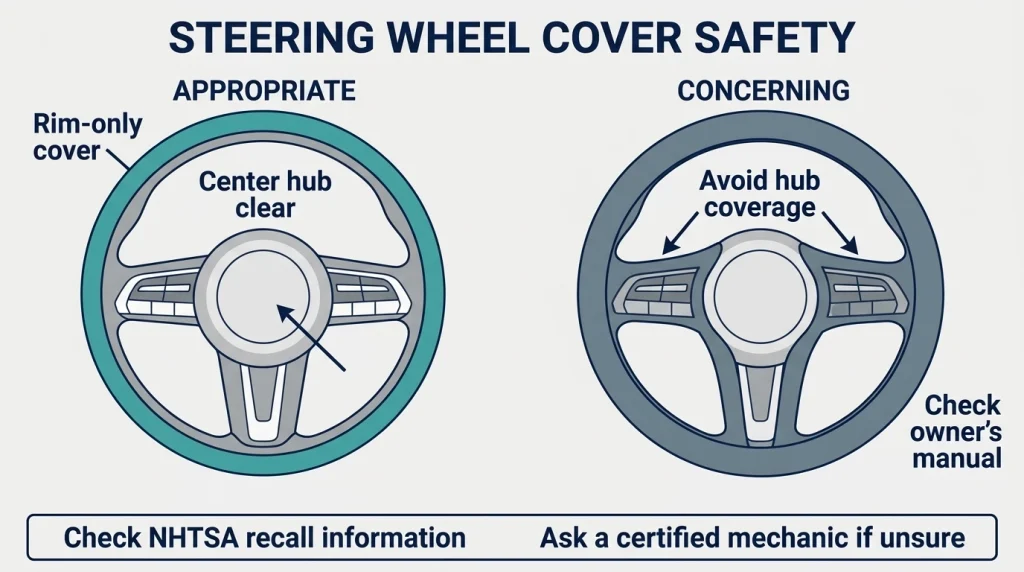
A rim-only cover is generally safer than one that crosses the centre hub or airbag cover. Never fit a cover over the airbag cover itself.
SRS stands for Supplemental Restraint System, the airbag system in your car. It needs a clear path to work as designed.
A cover on the rim should not block that path. A cover that wraps the hub, stitches over the centre, or adds bulk near the airbag seam can raise a safety concern.
Pro tip: check your vehicle’s owner’s manual and NHTSA’s recall lookup before you change any steering or airbag part, and ask a certified mechanic if you are unsure.
Consumer Reports also covers vehicle safety in general terms. It cannot replace your manual for your exact model.
Rules for aftermarket parts vary by place. Check local guidance if you plan a larger wheel change, not just a rim cover.
Section takeaway: Keep covers on the rim only, keep the airbag area clear, and check your manual when in doubt.
Frequently Asked Questions
Will a steering wheel cover break my cruise control buttons?
A well-fitted cover should not break cruise control, because it should not touch those buttons at all. If cruise stops after fitting, remove the cover, test the buttons again, and check your manual before you assume a deeper fault.
Can a cover block heated steering wheel buttons?
A rim-only cover should leave heated-wheel buttons free, since those controls sit on the spokes. A thick or shifting cover can make them hard to find or press, so refit or remove it if heat controls feel blocked.
Should I remove a cover if a button feels stuck?
Yes, remove it right away if a button feels stuck, mushy, or pressed down on its own. Test the button without the cover, clean any trapped grit gently, and do not force a stuck control.
Do covers damage touch-sensitive steering wheel controls?
Yes, touch controls can be more sensitive, because they rely on a light touch or swipe. Thick material can dull that input, so choose a thin, well-cut cover and test every swipe before you drive far.
Can a tight cover cause a button to press by itself?
It is possible, though uncommon, if tight material pulls across a button edge or presses a raised control. Remove the cover at once if any control acts on its own, and do not drive with a button stuck down.
Is it safe to cut a hole in a cover for buttons?
Cutting a hole can help in theory, but it can also fray, shift, and leave a rough edge near a control. A cover made with a proper cutout for your layout is a safer choice than a home-cut hole.
The Bottom Line
Choose a rim-only, custom-fit cover, test every button, and remove it if any control feels blocked. That habit protects both your buttons and your drive.
As of 2026, the safest rule stays simple: if a cover hides a control, it does not fit your wheel.

Daniel Brooks is an automotive writer and product researcher focused on car accessories, car tech, maintenance, and practical driving guides. At Plug-in Car World, he helps drivers make smarter automotive decisions through honest reviews and research-driven content.